Program settings
Basis
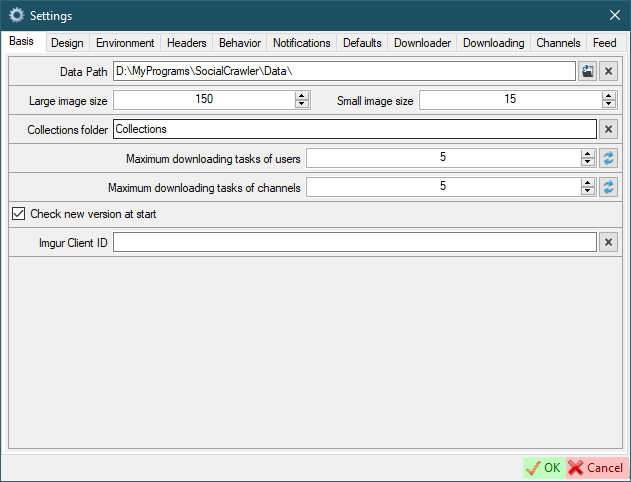
Data path- this is the root path where the data will be placed.Large/Small image size- the size of the user icons.Collections folder- just the name of the collections folder.Maximum download tasks of users- the number of simultaneously downloading profiles.Maximum download tasks of channels- the number of simultaneously downloading channels.Check new version at startImgur Client ID- Imgur client ID to Bypass NSFW protection and download galleries
Design
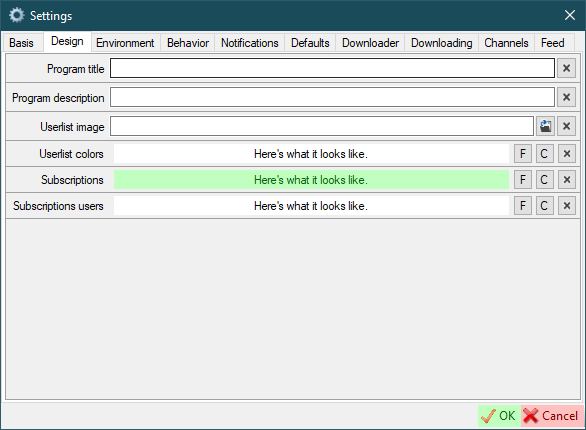
Program title- change the title of the main window if you need to.Program description- add some additional info to the program info if you need.Userlist image- customize the image that will be displayed at the background of the main windowUserlist color- set the background color and font color of the main window (Fbutton to select font color;Cbutton to select background color)Subscriptions- set the background color and font color of subscriptions (Fbutton to select font color;Cbutton to select background color)Subscriptions users- set the background color and font color of users added as subscriptions (not search queries) (Fbutton to select font color;Cbutton to select background color)
Environment
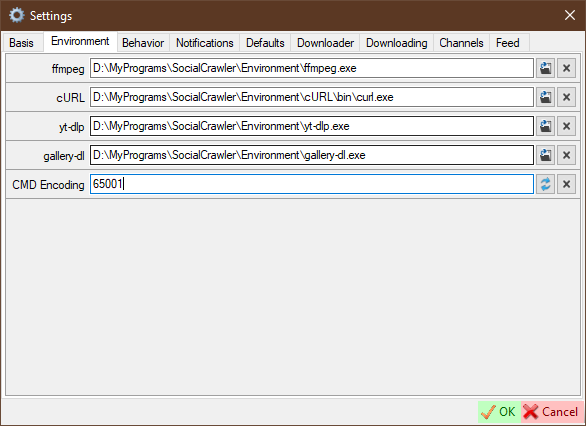
ffmpeg- path to ffmpeg.exe filecURL- path to curl.exe fileyt-dlp- path to yt-dlp.exe filegallery-dl- path to gallery-dl.exe fileCMD Encoding- command line encoding. It is highly recommended to change this value to an encoding that fully supports your language. The default value is 65001 (Unicode).
Headers
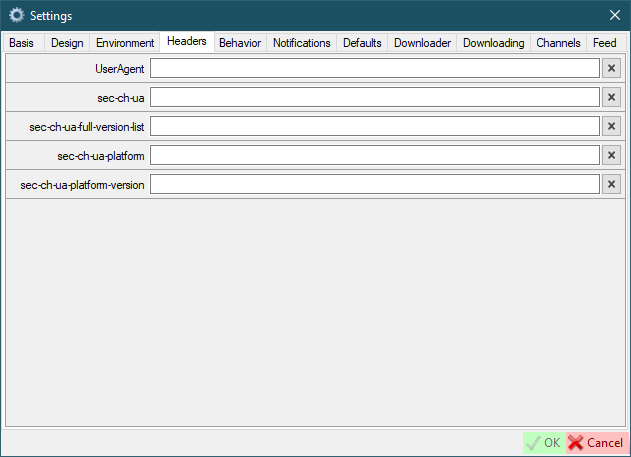
Here you can configure default browser headers, which can be used in the site settings. In the site settings, where available, you will see a checkbox to the left of the header text field. If checked, the value will be inherited from the global settings default values.
Behavior
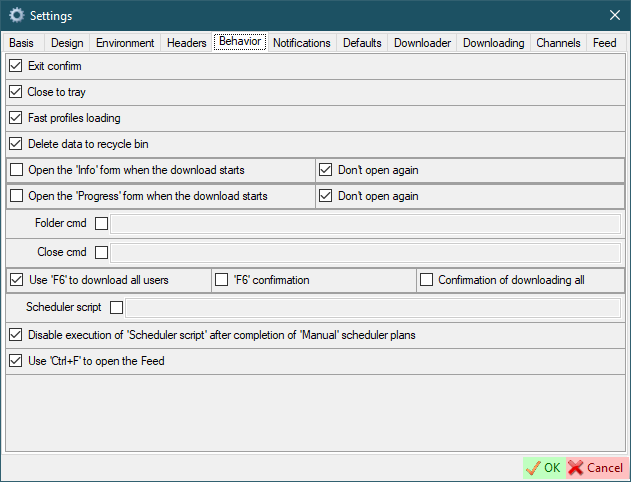
Exit confirm- ask for confirmation before closing the programClose to tray- close program to system trayFast profiles loading- fast loading profiles in the main windowDelete data to recycle bin- delete data to recycle bin or permanentOpen the Info form when the download startOpen the Progress form when the download startDon't open again- Do not automatically open the corresponding form if it was once closedFolder cmd- the command to open a folderClose cmd- this command will be executed when SCrawler is closedUse 'F6' to download all users'F6' confirmation- request confirmation to download all users when pressingF6Confirmation of downloading all- request confirmation to download all users anywayScheduler script- execute the following script after the scheduler plan is completed (example)Disable execution of 'Scheduler script' after completion of 'Manual' scheduler plansUse 'Ctrl+F' to open the Feed- if checked,Ctrl+Fwill be used to open the Feed. Otherwise,Alt+Fwill be used.
Notifications
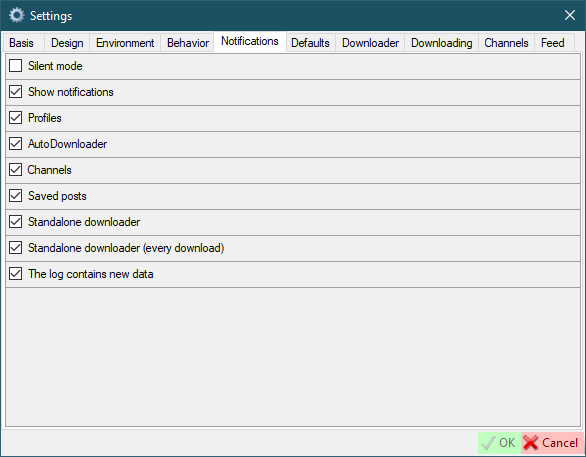
Silent mode- Temporarily disabling notifications. This setting is not stored in the settings file. It is valid until you turn it off or close the program.Show notification- This is the base value of notifications. If you disable it, notifications will not appear at all.Profiles- Show notifications when profiles download is complete.AutoDownloader- Show AutoDownloader notifications.Channels- Show notifications when channels download is complete.Saved posts- Show notifications when saved posts download is complete.Standalone downloader- Show notifications when all downloads in standalone downloader are completed.Standalone downloader (every download)- Show notifications when download in standalone downloader is complete.The log contains new data- Show a notification when the new data is added to the log.
Defaults
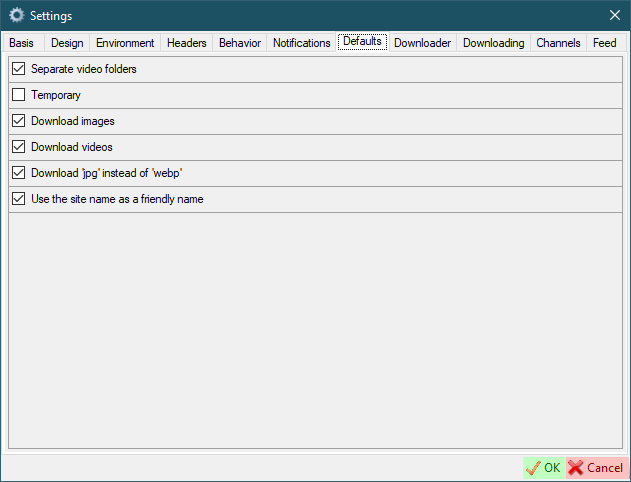
Separate video folder- this means that video files will be placed in a separate folder in the user's folder to store video files separately from images.Temporary- this parameter specifies how users will be created by default in the user creation form.Download images/videos- defaults for creating new usersDownload jpg instead of webp- savewebpimages asjpgUse the site name as a friendly name- use the user's site name as a friendly name
Downloader
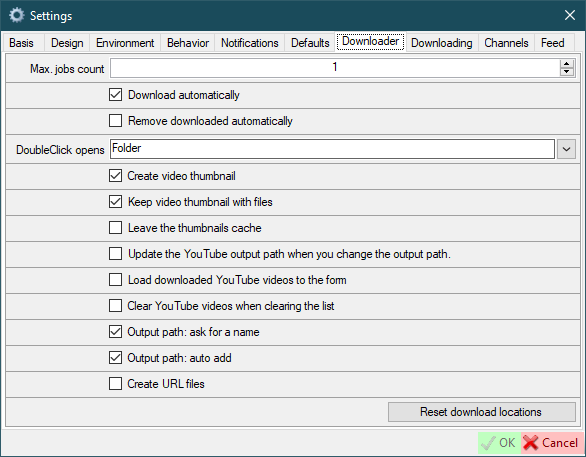
Max. jobs count- maximum number of concurrent jobs.Download automatically- start downloading automatically when new URL is added.Remove downloaded automatically- remove downloaded item from the list when item downloading is complete.DoubleClick opens- what do you want to open when you double click on an item.Create video thumbnail- create video thumbnail for downloaded video.Keep video thumbnail with files- save video thumbnail along with the file or in the cache (only works withCreate video thumbnail).Leave the thumbnails cache- if disabled, video thumbnails will be deleted after SCrawler closes. Only works withCreate video thumbnailandKeep video thumbnail with files.Update the YouTube output path when you change the output path- update YouTube output path every time you change file destination.Load downloaded YouTube videos to the form- if checked, downloaded YouTube videos will be loaded to the form. Otherwise, all downloaded data will be loaded to the form except YouTube data.Clear YouTube videos when clearing the list- if checked, YouTube videos will also be removed from the list. This action will also affect the standaloneYouTubeDownloaderapp.Output path: ask for a name- ask for a name when adding a new output path to the list.Output path: auto add- add new paths to the list automatically.Create URL files- create local URL files to link to the original page.Reset download locations- all saved download locations will be deleted.
Downloading
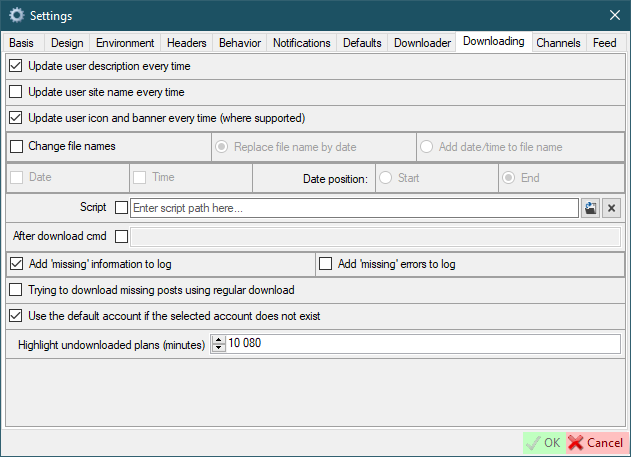
Update user description every time- this means that the user description (if implemented) will be checked when the user is parsed. If the current user description does not contain a new description, then a new one will be added via a new line.Update user site name every time- this means that the user site name (if implemented) will be updated when the user is parsed.Update user icon and banner every time (where supported)- this means that the user icon and banner (if implemented) will be downloaded when the user is parsed.Change file names- name files by name (not by original names)- Options:
Replace file name by date- the file name will be replaced with the date of the file was postedAdd date/time to file name- the date will be appended to the file name
- Parameters:
Date- append date to file nameTime- append time to file name- Date positions
Start/End- date and/or time will be appended to the end or beginning of the file name
- Options:
Script- script to be executed after the user download is complete. If the checkbox is checked, new users will be created with theUse scriptoption.After download cmd- this command will be executed after all downloads are completedAdd missing information to log- Text will be added to the log stating that the missing posts exist.Add missing errors to log- Each error that prevents SCrawler from downloading a file will be added to the log.Trying to download missing posts using regular download- If missing posts exist, the missing posts will attempt to be downloaded via user download.Use the default account if the selected account does not exist- Use the default account if you deleted an account that you used for some users.Highlight undownloaded plans (minutes)- Highlight (in gray) the scheduler plans that have not been downloaded inxminutes.-1to disable.
Channels
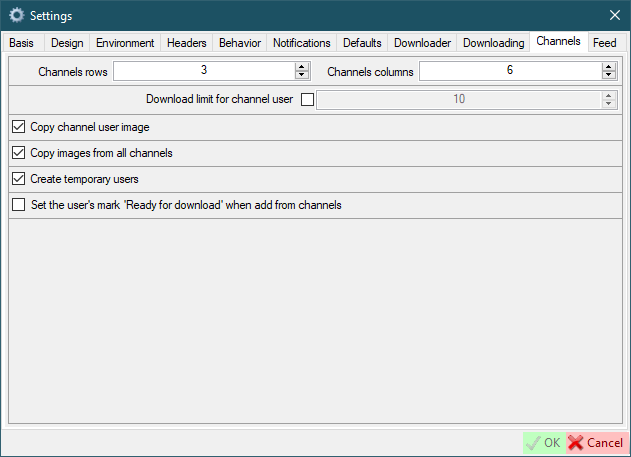
Channels rows/columns- how many rows and columns will be displayed in the channels form. For example: rows = 2; columns = 5. In this case, 10 images will be placed on one page in two rows of 5 columns. Please don't set too high value.Download limit for channel user- the amount of media will be downloaded if the user added from the channel.Copy channel user image- the image posted by user in the channel will be copied to the user folder when user will be created.Create temporary users- users will be created marked 'Temporary' when created from channel.Set the user's mark 'Ready for download' when add from channels
Feed
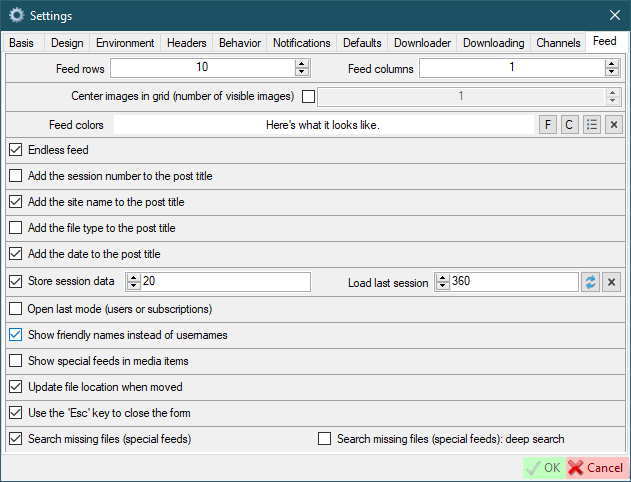
Feed rows/columns- how many rows and columns will be displayed in the feed formCenter images in grid (number of visible images)- don't fit images to the grid, but center them and set the number of visible images (only works when the number of columns is 1)Feed colors- set the background color and font color of the feed window (Fbutton to select font color;Cbutton to select background color)Endless feed- go to the next page when you reach the endAdd the session number to the post title- the session number will be displayed to the left of the post title. A session is every time when you (or AutoDownloader) download data.Add the site name to the post title- the site name will be displayed to the left of the post title.Add the file type to the post title- the file type will be displayed to the left of the post title.Add the date to the post title- The download date and time will be displayed to the right of the post title.Store session data- If checked, session data will be stored in an xml file. The number indicates the number of sessions to be saved.Load last session- try loading the last session of the current day (if it exists) as the current session after restarting SCrawler. -1 - disabled. 0 - only the session of the current day. >0 - the value (in minutes) that must elapse since last file download in a session for that session to be considered current.Open last mode (users or subscriptions)- if disabled, the user mode will be used when initializing the feed.Show friendly names instead of usernamesShow special feeds in media items- if you have one or more special feeds, they will appear in the additional post context menu. Disabled by default. Enabling this setting may increase memory consumption.Update file location when moved- the file location will be updated in the session data and in the feeds data.Use the 'Esc' key to close the formSearch missing files (special feeds)- search for missing file in the entire user folderSearch missing files (special feeds): deep search- deep search means that the missing file will be searched in other users' locations as well.
Site settings
If you see something like Jobs <number> in the progress bar, it means that SCrawler is still collecting information. In some cases, SCrawler takes some time to collect information for downloading files.
Red highlight means that the field is required or you have entered an incorrect value. White highlight means the field is optional.
You can add an additional account by clicking the Add new account button in the main window.
ALL SETTINGS NOT MARKED IN RED ARE OPTIONAL
Video on how to configure

Sites requirements
- Bluesky
- OnlyFans
- Mastodon
- Threads
- JustForFans
- RedGifs
- YouTube
- TikTok
- PornHub
- XHamster
- XVIDEOS
- ThisVid
- LPSG
Site default fields
-
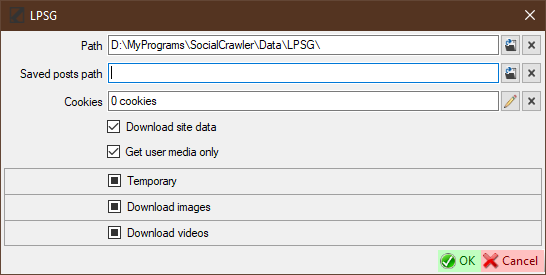
Path- where users' data will be placed. -
Saved posts path- if you wish, you can specify a special path for saved posts. Leave it blank to use the default path. Saved Twitter posts are posts that you have bookmarked. -
Cookiesadd cookies from your browser (click the pencil button to open the cookies editor). -
Download site data- You can disable downloading data from the site if you need it. If disabled, this site's data (images, videos, etc) will not be downloaded. -
Download saved posts- You can enable/disable downloading of saved posts for the editing account (if this site supports downloading of saved posts). -
Get user media only- the default for creating new users -
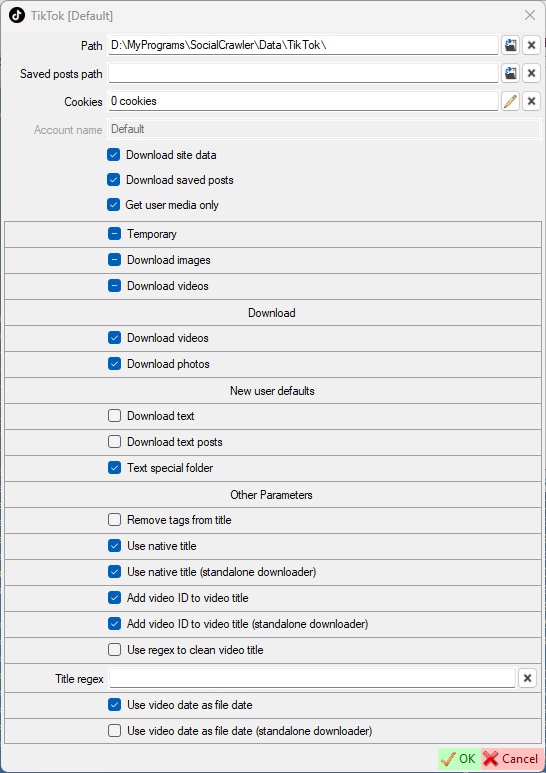
Temporary,Download images/videos- personal site settings by default for creating new users. Means the same as the parameters of the same name on theDefaultstab. If the checkbox is in an intermediate state, then the same name setting of theDefaultstab will be used instead. Otherwise, this setting will be applied. -
New user defaultsDownload text- download text (if available) for posts with image and video. If this checkbox is checked, the post text will be downloaded along with the file and saved under the same name but with thetxtextension.Download text posts- download text (if available) for text posts (no image and video)Text special folder- if checked, text files will be saved to a separate folder
Basic rules for sites settings
- Always add cookies first (if required). Some fields can be extracted and filled from cookies.
- When updating cookies, I recommend updating headers as well (if required)
- If your browser has been updated, it's highly recommended to update headers and cookies (especially for Instagram and OnlyFans) (if required)
Program environment
Use the correct version (x64/x86). The latest version can be found in the changelog. Download only exe files.
ffmpeg
ffmpeg is required for several sites like Reddit, PornHub, XHamster, XVIDEOS, etc. It is included in the SCrawler release, but you can download ffmpeg from:
The following sites use ffmpeg:
Gallery-dl
The following sites use gallery-dl:
YT-DLP
The following sites use yt-dlp:
OF-Scraper
Don't download the exe file. Always download zip.
Don't put the program in the SCrawler's Environment folder because if you use the updater to update SCrawer, you'll lose 'OF-Scraper'. I recommend creating an Environment2 folder and placing 'OF-Scraper' there.
Don't rush to update 'OF-Scraper'. Users using 'OF-Scraper' report that minor releases contain many bugs.
Go to the OnlyFans OF-Scraper chapter.
Paid sites partial support
Partial support means that I don't have personal accounts on paid porn sites because I don't pay for porn. If this site has stopped downloading and you want me to fix it, please be ready to give me access to an account with at least one active subscription. Otherwise, the download from this site will not be fixed.
User query options
Available for search queries only. Not used when creating users.
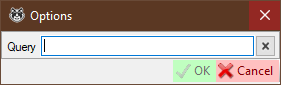
You can modify an existing query if you need to. This can be suitable when the site changes query parameters such as order, filters, etc. You can also change query completely, but I don't recommend doing that.
The Reddit parser can parse data without cookies, but you can add it if you like.
You need to set up credentials like Login, Password, Client ID, Client Secret and Bearer token (don't copy manually). When setting up OAuth, you need to check Use the token to download the timeline & Use cookies to download the timeline.
- Authorization
Login- your authorization username (how to get)Password- your authorization password (how to get)Client ID- your registered app client ID (how to get)Client Secret- your registered app client secret (how to get)Bearer token- bearer token (authorizationheader) (can be null). If you are using cookies to download the timeline, it is highly recommended that you add a token. There is not need to add a token if you are not using cookies to download the timeline. Don't enter the token manually! Always use the curved arrows to get the token!Token refresh interval- interval (in minutes) to refresh the tokenUse the token to download the timelineUse the token to download saved postsUse cookies to download the timelineSaved posts user- your personal Reddit username to download your saved posts (this feature requires cookies)Concurrent downloads- the number of concurrent downloads
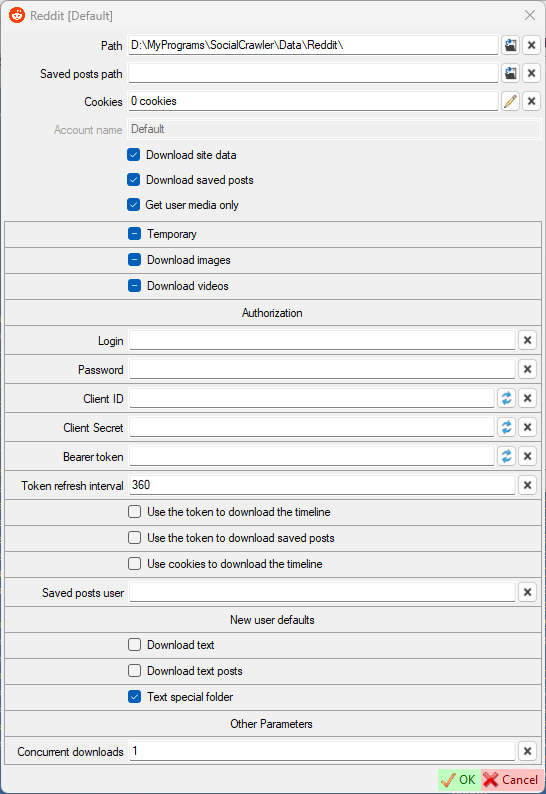
Reddit requirements
- Cookies for downloading saved posts
- ffmpeg for downloading videos hosted on Reddit
- Imgur client ID to download Imgur content posted on Reddit
How to get Reddit credentials
- Read this: https://github.com/reddit-archive/reddit/wiki/OAuth2-Quick-Start-Example
- Create an app (script) here (use this guide): https://www.reddit.com/prefs/apps
- When your app is created, you need to go to the following URL (replace the
<FIELD_NAME>fields with the values from the app you registered) and clickAllow:https://www.reddit.com/api/v1/authorize?client_id=<CLIENT_ID>&response_type=code&state=SSS&redirect_uri=<REDIRECT_URL>&duration=permanent&scope=adsread,adsconversions,history - Add your credentials to SCrawler and click on the curved arrows in the
Tokenfield.
Reddit user settings
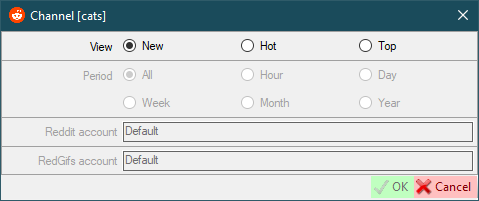
View- works the same as Reddit view modes (new,hot,top)Period- only works withTopview mode and the same as Reddit periodsReddit account- select the Reddit account that will be used to download the dataRedGifs account- select the RedGifs account that will be used to download the data
- Authorization
Use UserAgent- use UserAgent in requestsUserAgent
- New user defaults
Use the appropriate model- use the appropriate model for new users. If disabled, all download models will be used for the first download. Next, the appropriate download model will be automatically selected. Otherwise the appropriate download model will be selected right from the start.Media Model: allow non-user tweets- allow downloading non-user tweets in the media-model.Download GIFs- (default for new users) this can also be configured for a specific user.GIFs special folder- (default for new users) Put the GIFs in a special folder. This is a folder name, not an absolute path (examples:SomeFolderName,SomeFolderName\SomeFolderName2). This folder(s) will be created relative to the user's root folder. This can also be configured for a specific user.GIF prefix- (default for new users) this prefix will be added to the beginning of the filename. This can also be configured for a specific user.Use MD5 comparison- (default for new users) each image will be checked for existence using MD5 (this may be suitable for the users who post the same image many times). This can also be configured for a specific user.
- Downloading
New endpoint: search- use new endpoint argument (-o search-endpoint=graphql) for the search model.New endpoint: profiles- use new endpoint argument (-o search-endpoint=graphql) for the profile models.Abort on limit- abort twitter downloading when limit is reached.Download already parsed- download already parsed content on abort.Sleep timer- use sleep timer in requests. You can set a timer value (in seconds) to wait before each subsequent request.-1to disable and use the default algorithm. Default:20. Read more here.Sleep timer at start- set a sleep timer (in seconds) before the first request.-1to disable.-2to use theSleep timervalue. Default:-2Concurrent downloads- the number of concurrent downloads.Use the new Twitter icon (X)- restart SCrawler to take effect
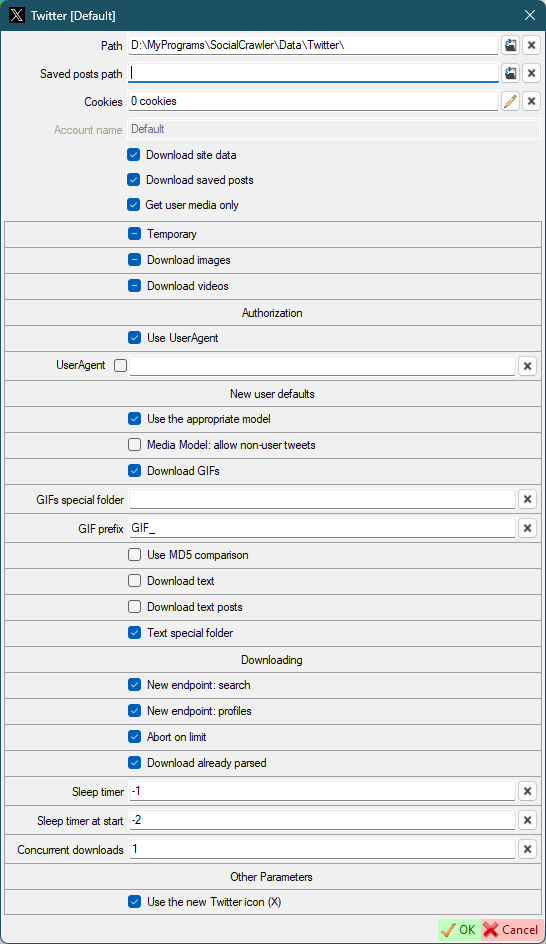
Twitter requirements
Attention! If you are trying to download a community, uncheck the Get user media only flag!
Twitter sleep timers
To completely download a large profile, you can use sleep timers. The sleep timer value is the time in seconds that the SCrawler waits before executing the next request. The optimal and safe value is 20 seconds. Sleep timers are disabled by default because they are slow down download. But if you have too many Twitter profiles in SC, I recommend enabling them. If you enable them, I also recommend enabling UserAgent.
Twitter user settings
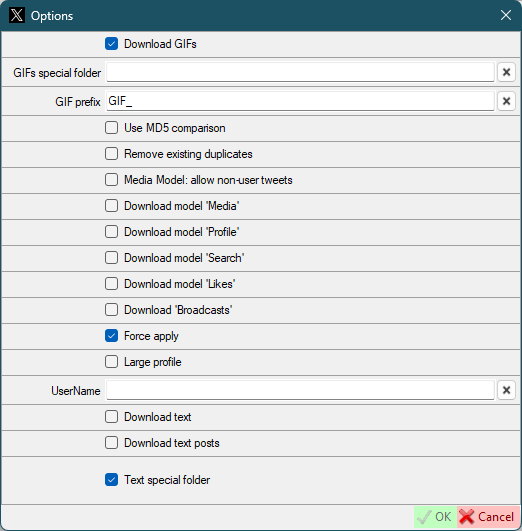
Download GIFs- same as default twitter settings, but for this userGIFs special folder- same as default twitter settings, but for this userGIF prefix- same as default twitter settings, but for this userUse MD5 comparison- same as default twitter settings, but for this userRemove existing duplicates- Existing files will be checked for duplicates and duplicates removed. Works only on the first activation 'Use MD5 comparison'.Media Model: allow non-user tweets- same as default twitter settings, but for this userDownload model 'Media'- Download the data using thehttps://twitter.com/UserName/mediacommand.Download model 'Profile'- Download the data using thehttps://twitter.com/UserNamecommand.Download model 'Search'- Download the data using thehttps://twitter.com/search?q=from:UserName+include:nativeretweetscommand.Download model 'Likes'- Download the data using thehttps://twitter.com/UserName/likescommand.Force apply- force overrides the default parameters (download model) for the first download (applies to first download only).UserName- if the user has changed their UserName, you can set a new name here. Not required for new users.Large profile- this setting is only used on the first download and is intended to temporarily override the default site settings if they are incompatible with downloading large profiles. After the first download is complete, this option will be disabled and cannot be enabled again.
You don't need to change the Download model parameters. During the first download SCrawler will determine the optimal parameters. These are the command parameters for gallery-dl. Change them only if you know what you are doing.
Bluesky
User name- your account username (handle)Password- your account password
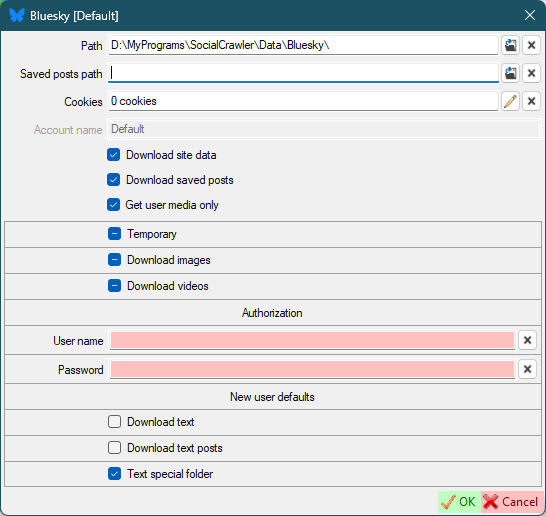
Bluesky requirements
User namePassword
OnlyFans
- Authorization
user-id,x-bc,app-token,sec-sc-ua,UserAgent- required headers (how to find (the request you need must start withposts?limit=.....))
- New user defaults
Download timeline- download user timelineDownload stories- download profile stories if they existsDownload highlights- download profile highlights if they existsDownload chat- download unlocked chat media
- OF-Scraper support
OF-Scraper path- the path to theofscraper.exemp4decrypt path- the path to themp4decrypt.exekey-mode-default- change the key-mode. Default:cdrm. Change this value only if you know what you are doing.keydb_api- change the keydb_api. Change this value only if you know what you are doing.Private key- path to the DRM key fileprivate_key.pemClient ID- path to the DRM key fileclient_id.binbackend- the value ofadvanced_optionsin the configuration. If you can't download the video, try usinghttpx.
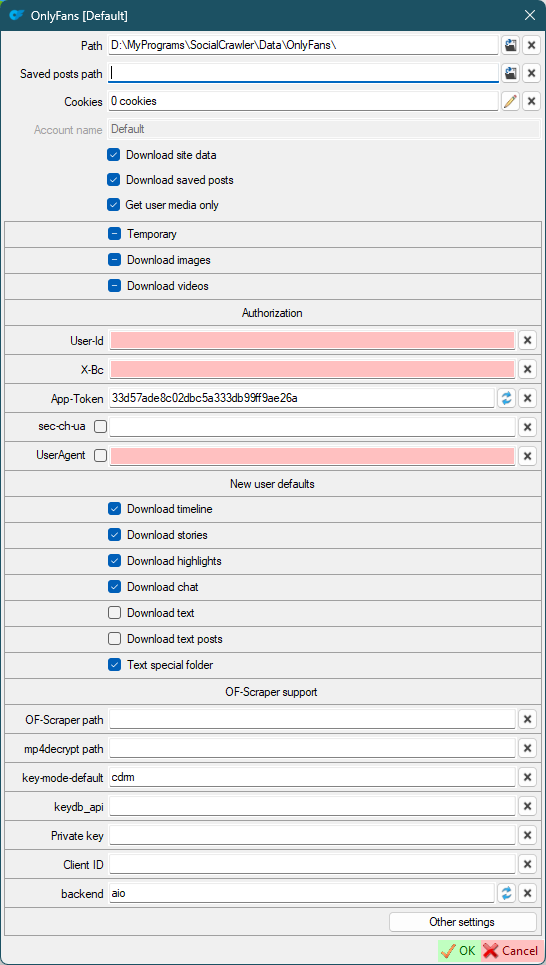
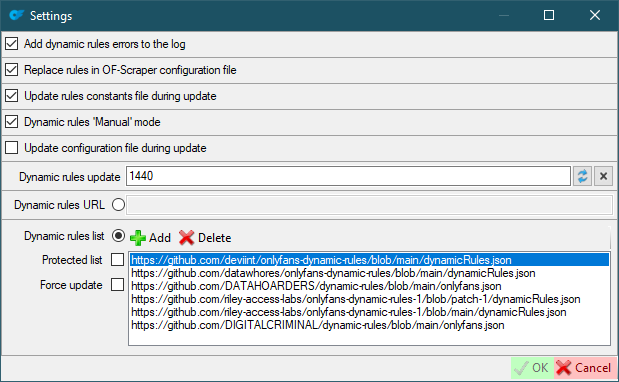
Other settings (change these values only if you know what you are doing)
Add dynamic rules errors to the log- OnlyFans errors will be added to a separate log. A checked checkbox means that error notification will be added to the main log.Replace rules in OF-Scraper configuration file- If checked, the dynamic rules (in the config) will be replaced with actual values.Update rules constants file during update- Update rules constants from the site during update.Dynamic rules 'Manual' mode- The rules will be added to the config as is, without using a link.Update configuration file during update- Update the configuration pattern from the site during update.Dynamic rules update- 'Dynamic rules' update interval (minutes). Default:1440.Dynamic rules URL- overwrite 'Dynamic rules' with this URL.Dynamic rules list- List of dynamic rules sources. If selected, the most recently updated source will be selected.Protected list- If checked, the new source will be added, but the rules list will not be overwritten by the updated one.Force update- Check this if you want to force the rules to update.
OnlyFans requirements
Cookies- Headers
- OF-Scraper to download DRM protected videos
OF-Scraper support
To download DRM protected videos, you need to download OF-Scraper and add it to the site settings in SCrawler.
Don't forget to read THIS!
- Download OF-Scraper zip file for Windows (release)
- Extract it to any folder you want
- Download mp4decrypt (how to, or download the binaries from here)
- Open SCrawler
- Open OnlyFans site settings
- Add the path to the ofscraper.exe
- Add the path to the mp4decrypt.exe
- Fill in the paths to your DRM keys (if you use them) (how to get them)
- If you use DRM keys, set
key-mode-defaultoption tomanual - Click OK
DRM keys: OF-Scraper reference, complete guide
OnlyFans FAQ
How to download videos?
You must pay for the profile you want to download
Can SCrawler download videos from OnlyFans without subscription.
No! SCrawler is not a hacking program. Just a downloader.
Mastodon
- Authorization
My Domain- your account domain withouthttps://(for example,mastodon.social)Authorization-Authorizationrequest header. Must start withBearerword. How to find.Token-x-csrf-tokenrequest header. How to find.
- New user defaults
Download GIFs- (default for new users) this can also be configured for a specific user.GIFs special folder- (default for new users) Put the GIFs in a special folder. This is a folder name, not an absolute path (examples:SomeFolderName,SomeFolderName\SomeFolderName2). This folder(s) will be created relative to the user's root folder. This can also be configured for a specific user.GIF prefix- (default for new users) This prefix will be added to the beginning of the filename. This can also be configured for a specific user.Use MD5 comparison- (default for new users) each image will be checked for existence using MD5 (this may be suitable for the users who post the same image many times). This can also be configured for a specific user.
- Other parameters
User related to my domain- open user profiles and user posts through my domain.
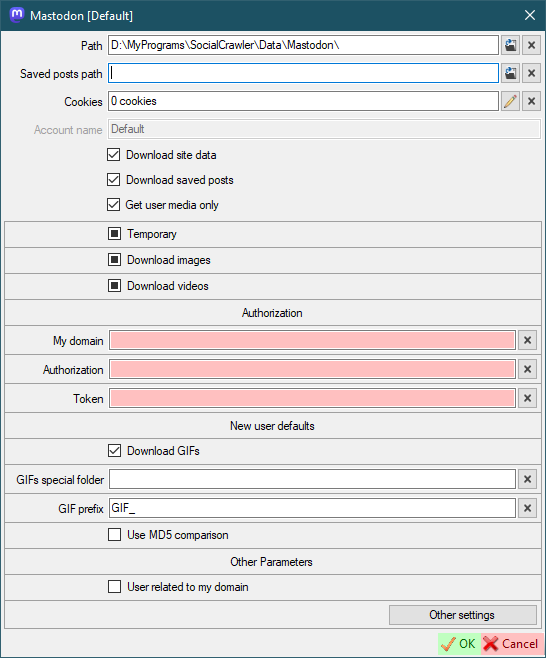
Mastodon requirements
My DomainAuthorizationTokenAuthorizationandTokenfor each domain you want to download from (see additional settings)
Mastodon additional setting
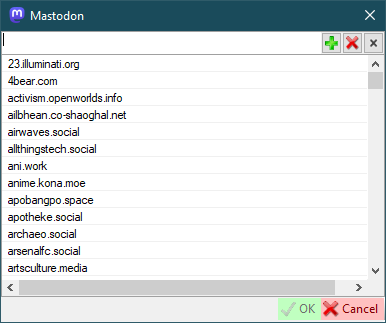
To support the downloading of this site you should add the Mastodon domain to this list.
- Authorization
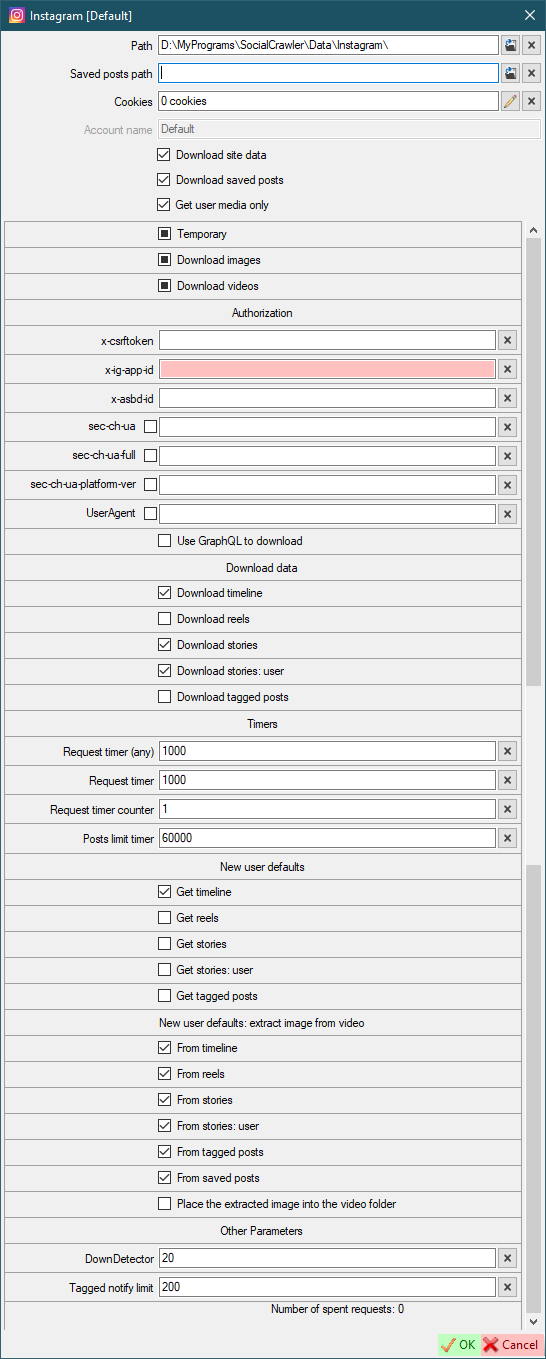
x-csrftoken- how to find (can be automatically extracted from cookies)x-ig-app-id,x-absd-id,ix-ig-www-claim,sec-ch-ua,sec-ch-ua-full-version-list,sec-ch-ua-platform-version,UserAgent- how to findUse GraphQL to download- Use GraphQL to download data instead of the current query algorithm.
- Download data
Download timeline- Download timeline (with this setting, you can simply enable/disable the downloading of some Instagram blocks)Download reels- Download reels (with this setting, you can simply enable/disable the downloading of some Instagram blocks)Download stories- Download stories (with this setting, you can simply enable/disable the downloading of some Instagram blocks)Download stories: user- Download active (non-pinned) user stories (with this setting, you can simply enable/disable the downloading of some Instagram blocks)Download tagged- Download tagged posts (with this setting, you can simply enable/disable the downloading of some Instagram blocks)
- Timers
Request timer (any)- the timer (in milliseconds) that SCrawler should wait before executing the next request. The default value is 1'000. It is highly recommended not to change the default value.Request timer- this is the time value (in milliseconds) the program will wait before processing the nextRequest time counterrequest (it is highly recommended not to change this default value)Request time counter- how many requests will be sent to Instagram before the program waitsRequest timermilliseconds (it is highly recommended not to change this default value)Post limit timer- this is the time value (in milliseconds) the program will wait before processing the next request after 195 requests (it is highly recommended not to change this default value)Next profile timer- the time value (in milliseconds) the program will wait before processing the next profile. -2 to use max timer. -1 to disable. The default value is -2 (it is highly recommended not to change this default value)
- Errors
Skip errors- skip the following errors (comma separated). Facing these errors will not disable the download, but will add a simple line to the log.Add skipped errors to the logSkip errors (exclude)- exclude the following errors from being added to the log (comma separated)Ignore stories downloading errors (560)- if checked, error560will be skipped and the download will continue. Otherwise, the download will be interrupted.
- New user defaults
Get timeline- default value for new usersGet reels- default value for new usersGet stories- default value for new usersGet stories: user- default value for new usersGet tagged photos- default value for new users
- New user defaults: extract image from video
From timeline- default value for new usersFrom reels- default value for new usersFrom stories- default value for new usersFrom stories: user- default value for new usersFrom tagged posts- default value for new usersPlace the extracted image into the video folder- default value for new users
- Other parameters
DownDetector- Use 'DownDetector' to determine if the site is accessible.-1to disable. The value represents the average number of error reports over the last 1 hour.Tagged notify limit- Limit of new tagged posts when you receive a notification (read more here)
If an error occurred and the log told you that you need to update your credentials, you also need to enable the disabled functions (Download timeline, Download stories) back.
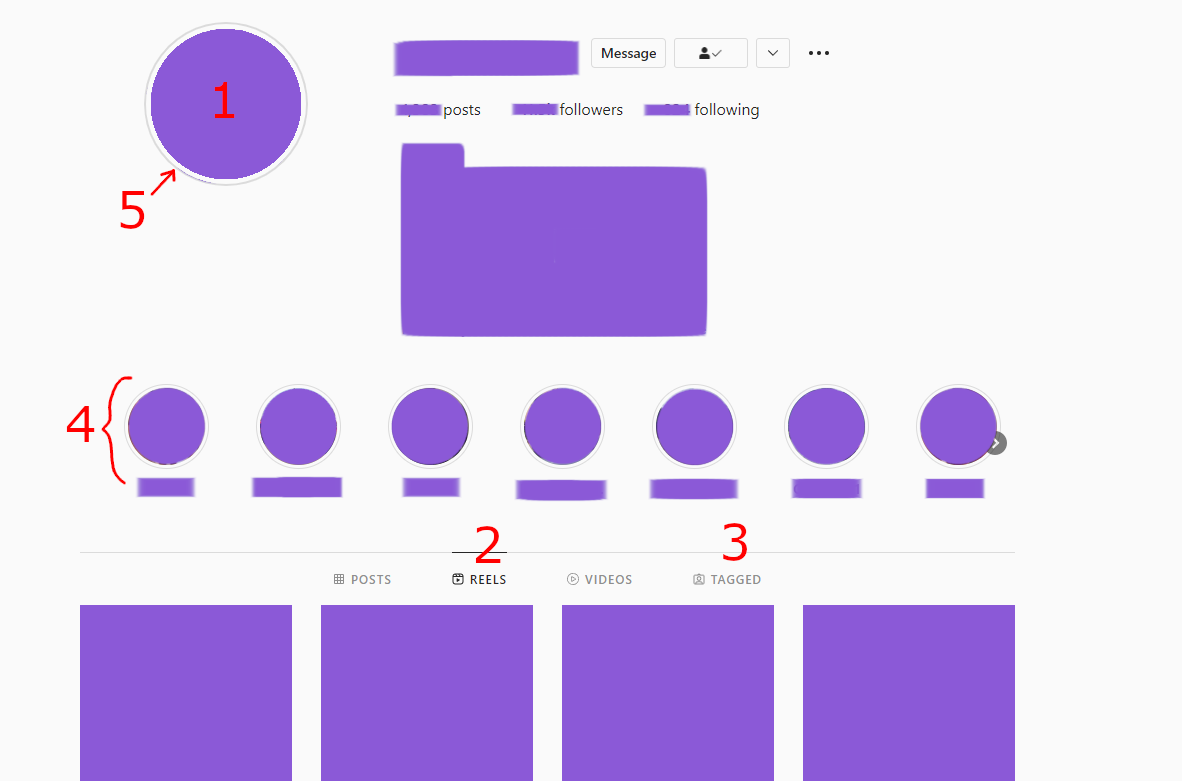
Instagram data means
- Avatar (download only for the first time)
ReelsTagged postsStoriesStories: user
Instagram requirements
- COOKIES ARE REQUIRED ANYWAY
x-csrftokenx-ig-app-id
Instagram tips
Join our Discord channel to stay up to date with the latest changes and helpful tips!
- If your browser has been updated, immediately update ALL fields in the SC for Instagram + cookies!
- If your credentials have expired, don't forget to re-check all download options you need (
Download datablock) after updating your credentials. - Allow Instagram to use third-party cookies.
- If you see a notification on Instagram such as
suspicious action, dismiss it and update your Instagram credentials in SC. - Download new profiles one by one. Wait for some time after downloading the new profile.
- If the user has too many stories, SC often throws an error. I recommend disabling their downloading. If you extremely need to download them, download them once and disable downloading after. Or create a scheduler plan to download them less often.
- I recommend you to update your credentials before downloading a large profile. And after that, wait at least an hour to continue downloading any Instagram accounts. And I also recommend you to update your credentials once again after download a large account.
Instagram limits
Instagram API is requests limited. For one request, the program receive only 50 posts. Before catching error 429, the program can process 200 requests. I reduced this to 195 requests and set a timer to wait for the next request after. This was added to bypass error 429 and prevent account ban.
After 195 requests Instagram downloader becomes much slower. Slowdown can be configured in the Instagram settings (Request timer, Request time counter, Post limit timer). Change these parameters at your own risk.
Instagram tagged posts limit
When the number of tagged posts exceeds the tagged posts limit, you will be asked what to do about it. This message box protects you from account ban and long wait times.
Instagram tagged posts no longer provide the total amount of tagged posts. I've corrected the tagged posts notification, but now I can't tell how many requests will be spent on downloading tagged posts. And from now on, one request will be spent on downloading each tagged post, because Instagram doesn't provide complete information about the tagged post with the site's response. In this case, if the number of tagged posts is 1000, 1000 requests will be spent. Be careful when downloading them. I highly recommend that you forcefully disable the downloading of tagged posts for a while (Settings-Instagram-Download tagged).
ATTENTION. Change the default parameters at your own risk. If you do this, I don't guarantee that your account will not be banned.
Continue- Continue downloadingContinue unnotified- Continue downloading and cancel further notifications in the current downloading sessionLimit- Enter the limit of posts you want to downloadConfirm- Confirm the number you enteredTry again- You will be asked again about the limitOther options- The main message with options will be displayed againCancel- Cancel tagged posts download operation
Disable and cancel- Disable downloading tagged data and cancel downloading tagged dataCancel- Cancel tagged posts download operation
stateDiagram
state "Message" as Start
state "Continue" as btt1_1
state "Continue unnotified" as btt1_2
state "Limit" as btt1_3
state "Disable and cancel" as btt1_4
state "Cancel" as btt1_5

state "Confirm" as btt2_1
state "Try again" as btt2_2
state "Other options" as btt2_3
state "Cancel" as btt2_4

state "Continue download" as result_continue
state "Cancel download" as result_cancel

state "Enter the number of posts from user that you want to download" as opt1

[*]-->Start

Start-->btt1_1
Start-->btt1_2
Start-->btt1_3
Start-->btt1_4
Start-->btt1_5

btt1_1-->result_continue
btt1_2-->result_continue
note left of btt1_2
	Continue downloading and cancel further
	notifications in the current downloading session.
end note
btt1_3-->opt1
btt1_4-->result_cancel
note right of btt1_4
	Disable downloading tagged data for this user
	 and cancel downloading tagged data.
end note
btt1_5-->result_cancel

opt1-->btt2_1
opt1-->btt2_2
opt1-->btt2_3
opt1-->btt2_4

btt2_1-->result_continue
btt2_2-->opt1
btt2_3-->Start
btt2_4-->result_cancel

result_continue-->[*]
result_cancel-->[*]
Threads
- Authorization
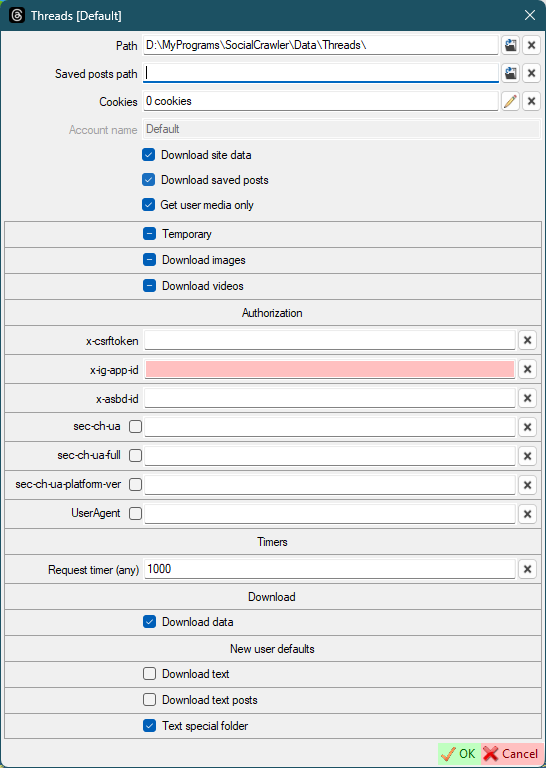
x-csrftoken- how to findx-ig-app-id,x-asbd-id,sec-ch-ua,sec-ch-ua-full-version-list,sec-ch-ua-platform-version,UserAgent- how to find
- Timers
Request timer (any)- the timer (in milliseconds) that SCrawler should wait before executing the next request. The default value is 1'000. It is highly recommended not to change the default value.
- Download
Download data- The internal value indicates that site data should be downloaded. It becomes unchecked when the site returns an error. When you update your credentials, you need to checked this check box.
Threads requirements
- Authorization
x-ig-app-id,x-asbd-id,Accept,sec-ch-ua,sec-ch-ua-full-version-list,sec-ch-ua-platform,sec-ch-ua-platform-version,UserAgent- how to find
- New user defaults
Download photosDownload videosDownload reelsDownload stories
- Timers
Request timer (any)- the timer (in milliseconds) that SCrawler should wait before executing the next request. The default value is 1'000. It is highly recommended not to change the default value.
- Download
Download data- The internal value indicates that site data should be downloaded. It becomes unchecked when the site returns an error. When you update your credentials, you need to checked this check box.
The Accept and UserAgent headers must be obtained from the page https://facebook.com/<USERNAME>.
If you can't find x-ig-app-id or x-asbd-id, you can get them from Instagram.
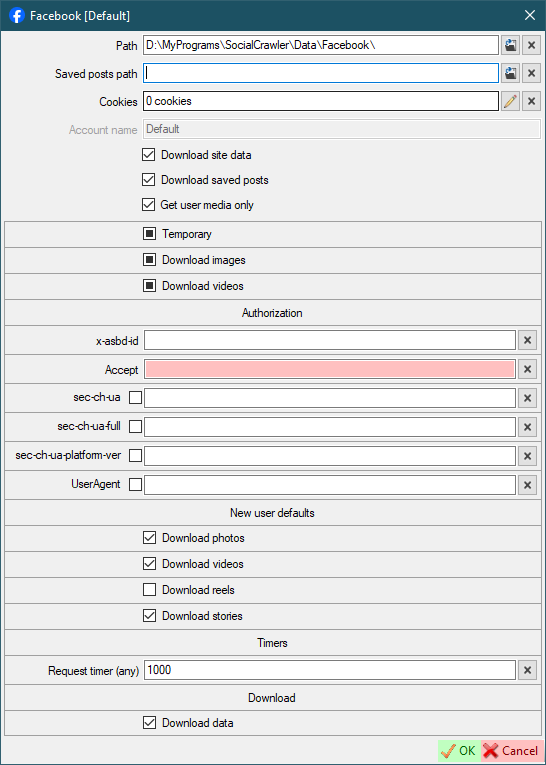
Facebook requirements
JustForFans
User ID- read belowUserHash4- read belowAccept- read belowUserAgent- read below
The Accept and UserAgent headers must be obtained from the page https://justfor.fans/<USERNAME>.
The User ID and UserAgent values must be obtained from the page https://justfor.fans/ajax/getPosts.php?Type=One&UserID=1234567&PosterID=123456&StartAt=0&Page=Profile&UserHash4=1234567890abcdef1234567890abcdef&SplitTest=0.
How to find headers and values
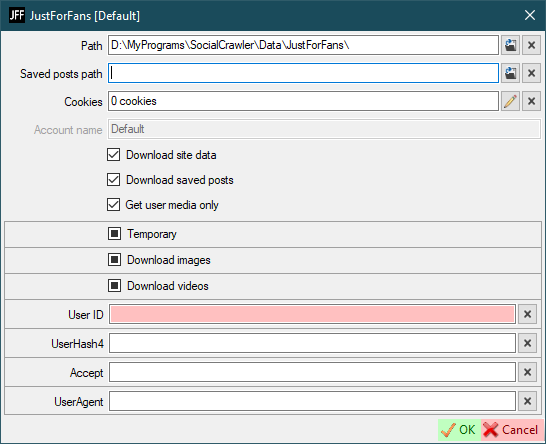
JustForFans requirements
JustForFans FAQ
How to download videos?
You must pay for the profile you want to download
Can SCrawler download videos from JustForFans without subscription.
No! SCrawler is not a hacking program. Just a downloader.
RedGifs
Token refresh interval- Interval (in minutes) to refresh the token
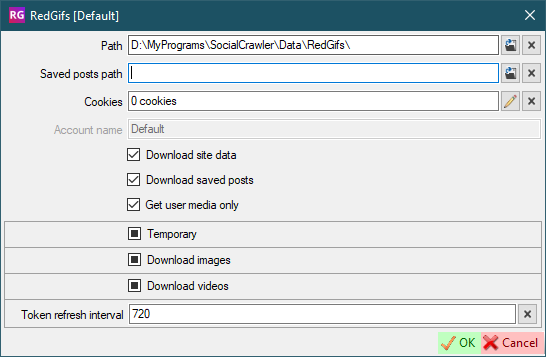
RedGifs requirements
Token- click on the curved arrows to refresh the token. Updated automatically. You don't need to set it manually.
You don't need cookies for RedGifs
You don't need to configure RedGifs settings at all!
But if you are using a VPN and your IP address is changed, you should open the settings and refresh the token (using the curved arrows).
YouTube
- Authorization
Use cookies- default value for new users. Use cookies to download the user.
- New user defaults
Download user videosDownload user shortsDownload user playlistsDownload user community: imagesDownload user community: videos
- Communities
YouTube API host- YouTube API instance host (YouTube-operational-API). Example:localhost/YouTube-operational-API,http://localhost/YouTube-operational-API(how to create)YouTube API key- YouTube Data API v3 developer keyIgnore community errors- if true, community errors will not be added to the log.
See additional settings here.
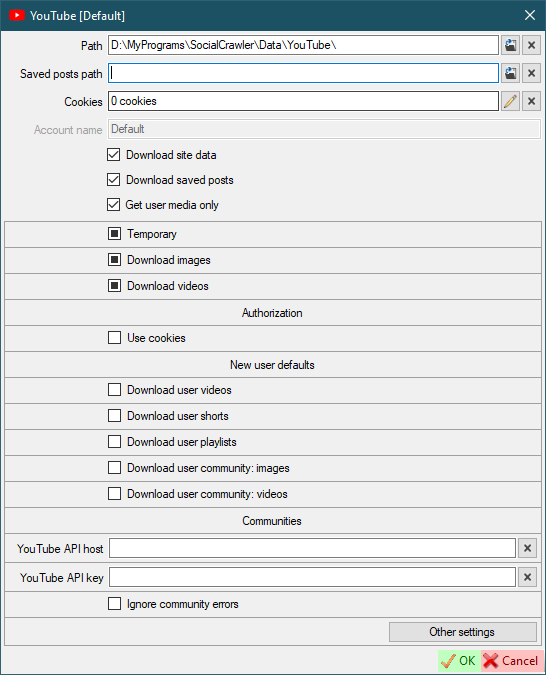
YouTube requirements
YouTube operational API
To download communities, you need to install the YouTube operational API.
The complete guide is here.
- Download and run WampServer 3. To install WampServer you'll need
VC Redistributable Packages. You can download them all from here (x86, x86 x64). Install each package 2010, 2012, 2013, 2015. - Open command prompt
- Type
cd C:\wamp64\www\ - Clone this repository by using
git clone https://github.com/Benjamin-Loison/YouTube-operational-API. To use this command you'll needGit. You can download it from here. - Close command prompt
- Download composer
- Download protoc
- Extract
protocfiles toc:\wamp64\www\YouTube-operational-API\protoc\ - Add
c:\wamp64\www\YouTube-operational-API\protoc\bin\to system paths - Install
composerwith default options - Open command prompt
- Type
c:\wamp64\www\YouTube-operational-API\ - Enter the following command
for /f "usebackq tokens=*" %a in (`dir /S /B "c:/wamp64/www/YouTube-operational-API/protoc/include/google/protobuf/"`) do protoc --php_out=proto/php/ --proto_path="c:/wamp64/www/YouTube-operational-API/protoc/include/google/protobuf/" %a
- Launch WampServer
- Verify that your API instance is reachable by trying to access: http://localhost/YouTube-operational-API/
- Add this URL to SCrawler YouTube settings
YouTube API host
YouTube operational API update
To update, stop WampServer, execute the following commands in administrator mode, then start WampServer again.
cd C:\wamp64\www\YouTube-operational-API\
git pull https://github.com/Benjamin-Loison/YouTube-operational-API
Deno
With the release of yt-dlp version 2025.11.12, external JavaScript runtime support has arrived.
All users who intend to use yt-dlp with YouTube are strongly encouraged to install one of the supported JS runtimes.
The following JavaScript runtimes are currently supported (in order of recommendation, from strongest to weakest):
- recommended for most users
- https://deno.com/
- https://github.com/denoland/deno
- note: if downloading from Deno's GitHub releases, get
denonotdenort
- note: if downloading from Deno's GitHub releases, get
- minimum Deno version supported by yt-dlp:
2.0.0- the latest version of Deno is strongly recommended
You can find full information here
Install Deno
Just launch PowerShell and run the following command:
irm https://deno.land/install.ps1 | iex
Concurrent downloads- the number of concurrent downloads.Saved posts user- personal profile username.
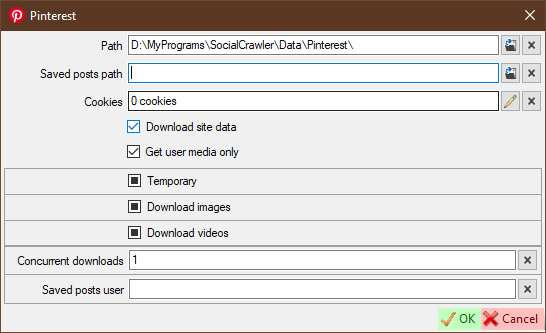
Pinterest requirements
Cookiesfor private data- gallery-dl
TikTok
Remove tags from title- if the title contains tags, they will be removed (only works withUse native title)Use native title- use a user-created video title for the filename instead of the video IDUse native title (standalone downloader)- use a user-created video title for the filename instead of the video IDAdd video ID to video title- the video ID will be added to the file nameAdd video ID to video title (standalone downloader)- the video ID will be added to the file nameUse regex to clean video titleTitle regex- regex to clean video title (only works with checkedUse regex to clean video title)Use video date as file date- set the file date to the date the video was added (website) (if available)Use video date as file date (standalone downloader)- set the file date to the date the video was added (website) (if available)
TikTok requirements
- yt-dlp
gallery-dlfor downloading photos
If you were using the yt-dlp-TTUser plugin, you should remove it because this plugin was added to yt-dlp itself! To delete the plugin you can use the following batch script.
@echo off
set p=%UserProfile%\AppData\Roaming\yt-dlp-plugins\yt-dlp-TTUser-master\
if exist %p% (
	RMDIR %p% /S /Q
	echo Plugin deleted: %p%
) else (
	echo Plugin not found!
)
PornHub
Download UHD- download UHD (4K) content.Download uploaded- download uploaded videos.Download tagged- download tagged videos.Download private- download private videos.Download favorite- download favorite videos.Download GIF- default for new users.Download GIFs as mp4- download gifs in 'mp4' format instead of native 'webm'.Saved posts user- personal profile username (to download saved posts)
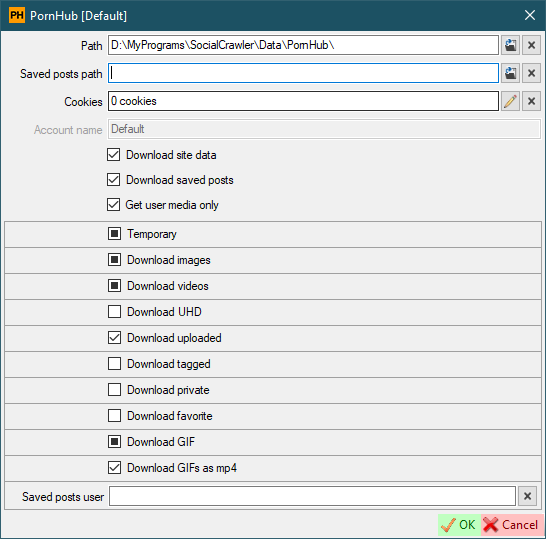
PornHub requirements
- cURL
- ffmpeg is required anyway
Cookiesfor downloading private videos and saved postsSaved posts userfor downloading saved posts
PornHub additional information
About videos. PornHub has at least three page views (as I've seen). If you find that videos from the account you want to download aren't downloading, you can create a new issue with that account address.
About photos. Photo download problems have the lowest priority. You can still create an issue including the account address where photos are not downloading, but I can't tell you when I will have time to fix it.
XHamster
Download UHD- Download UHD (4K) contentRe-encode downloaded videos if necessary- If enabled and the video is downloaded in a non-native format, the video will be re-encoded. Attention! Enabling this setting results in maximum CPU usage.
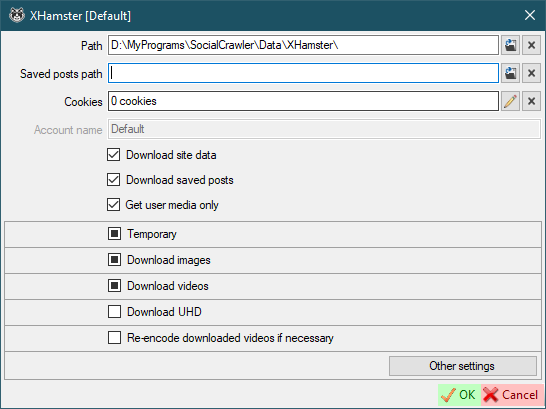
XHamster requirements
XVIDEOS
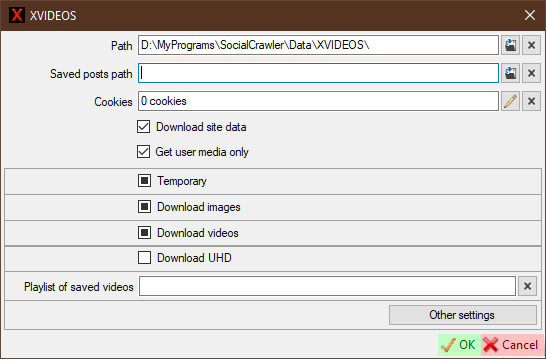
Download UHD- Download UHD (4K) content.Playlist of saved videos- Your personal videos playlist to download as 'saved posts'. This playlist must be private (Visibility =Only me). It also required cookies. This playlist must be entered by pattern:https://www.xvideos.com/favorite/01234567/playlistname.
XVIDEOS requirements
- ffmpeg is required anyway
Cookiesfor downloading private videos and saved postsPlaylist of saved videosfor downloading saved posts
ThisVid
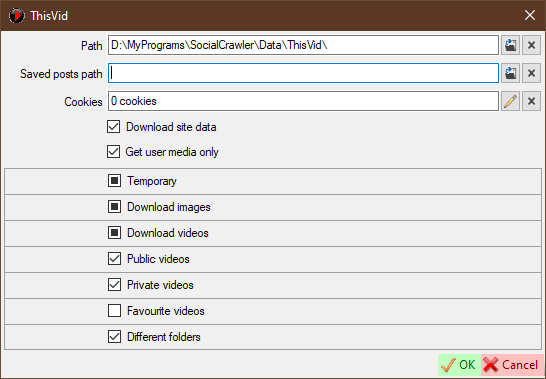
Public videos- download public videos.Private videos- download private videos.Favourite videos- download favourite videos.Different folders- Use different folders to store video files. Iftrue, then public videos will be stored in thePublicfolder, private - in thePrivatefolder. Iffalse, all videos will be stored in theVideofolder.
ThisVid requirements
ThisVid FAQ
How to download private videos?
Send a friend request to this user. After he accepts this, you will be able to download his private videos.
Can SCrawler download private videos from ThisVid without adding that person as a friend?
No! SCrawler is not a hacking program. Just a downloader.
LPSG
LPSG requirements
Download groups
Press Alt+F1 to display users (works in scheduler, scheduler plans, download groups). Click on a user and press Ctrl+F to find that user in the main window.
In many cases, you may need to download some users. You can group these users and make it easier to download them without having to select them every time.
It is very easy to create a new group. Just click the Add a new download group button (main window - Download menu) to create a new one.
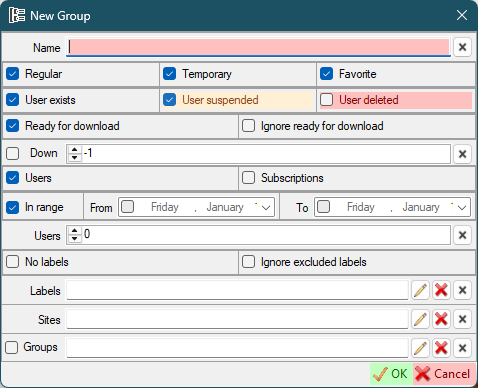
Name- group nameRegular- users not marked as temporary or favoriteTemporary- users marked as temporaryFavorite- users marked as favoriteUser exists- include users not marked as 'Suspended' or 'Deleted'User suspended- include users marked as 'Suspended' (read here about user internal marks)User deleted- include users marked as 'Deleted' (read here about user internal marks)Ready for download- users marked asReady for downloadIgnore ready for download- this option tells the program to ignore theReady for downloaduser option and download the user anywayDown- filter users who have been (not)downloaded in the lastxdays.-1or0to disable.Checked= downloaded in the lastxdays.Unchecked= NOT downloaded in the lastxdays"UsersSubscriptions- include subscriptions in the download queue (read about subscriptions here).In range- Last download date range.- If checked, filter users whose last download date is within the selected date range.
- If unchecked, filter users whose last download date is outside the selected date range.
- If no dates are checked, this option will be ignored.
- Dates:
- If only one date is checked, then that date is the limit.
- Example:
- You have the 'In range' checkbox and the 'From' date checked. This way, only those users whose last download date is greater than the 'From' date will be downloaded.
- If only one date is checked, then that date is the limit.
Users- the number of users that to be downloaded. The number is 0 = all users. Number greater than 0 = number of users from the beginning to the end of the list. Number less than 0 = number of users from end to the beginning of the list.- No labels
- Ignore excluded labels
Labels- You can select labels.Pencilbutton for selected labels. Only users who have one or more of these labels will be downloaded.Red Xbutton for excluded labels. Users who have one or more of these labels will be excluded from the download.
Sites- You can select sites.Pencilbutton for selected sites. Only users from the sites you have selected will be downloaded.Red Xbutton for excluded sites. Users from the sites you have selected will be excluded from the download.
Groups- You can select groups/Penciledit groups. The groups you selected will also be downloadedRed Xbutton for excluded groups. Users from the groups you have selected will be excluded from the download.Left checkbox- If checked, only the selected groups will be downloaded. All other options will be ignored. If unchecked: all the options of the new group will be used to filter the users to be downloaded; the selected groups will be also downloaded "as is", using their options.
You can set both selected and excluded options for each selection.
Only those users who match all of these parameters (logical operator AND) will be downloaded.
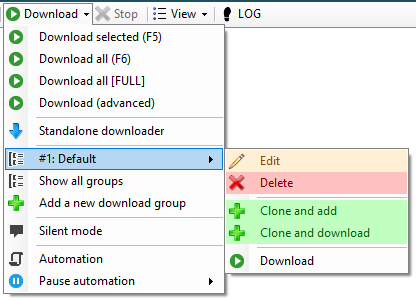
For each group, SCrawler creates a new menu, which is placed in the Download all menu of the main window. If a group has a number on the left (1-9), that group can be downloaded using Ctrl+Number. Each group also has several options:
Edit- edit groupDelete- delete groupClone and add- clone the group, change parameters and add this group as a new oneClone and download- clone the group, change parameters and download filtered users (this group will not be added as a new one)Download- download with the options you have set (Ctrl+Clickto download, exclude from feed)
Automation
You can set up automatic downloads. You can find these settings in Settings - Automation or by clicking the Automation button in the Download drop-down list in the main window.
Scheduler:
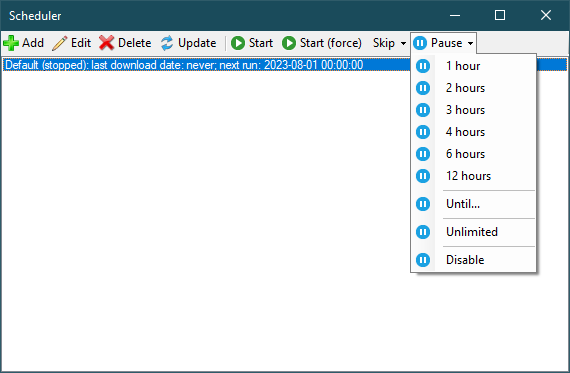
Add,Edit,Delete- operations with the selected plan;Update- refresh list;Start- run the created (stopped) plan;Start (force)- force start of the current task;Skip- skip next run:Skip- delay for the number of minutes configured in the task;Delay for minutes- delay for a specific number of minutes;Delay by date/timeDelay reset- reset the delay you set earlier.
Plan:
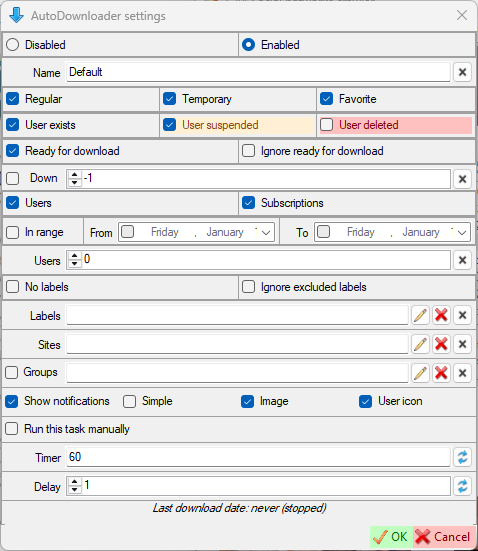
Disabled- Disable automatic downloads.Enabled- Enable automatic downloads (read more here).Show notifications- Show notification when there is new downloaded data.Simple- Show a simple notification instead of a user notification. This means that if any user data has been downloaded with the plan, a simple notification will be shown with the number of users downloaded. The 'Image' and 'User icon' parameters will be ignored.Image- Show downloaded image in notification.User icon- Show user icon in notification.Run this task manually- If this checkbox is selected, this task can only be started manually (using the 'Start (force)' button).Timer- Download timer (in minutes).Delay- Plan launch delay when SCrawler starts.
Folder command
You can specify a command to open a folder in a special program. Pattern: Command "{0}". "{0}" is the path argument. I like to use total commander and I want to open folders in this program. Example: D:\TotalCMD\TOTALCMD64.EXE /o "{0}".
"{0}" - required argument!
This command can be a batch command or any script file (bat, ps1 or whatever you want) with the incoming argument as a folder path.
How to set up cookies
First method
- Using a browser extension to receive site cookies, copy the cookies (or save them to a file) (you can use one of the recommended extensions or any other).
- Open the settings of the site you want to configure (for example,
Main window-Settings-Instagram). - Find the
Cookiesfield. - Click on the
Pencilbutton. - In the cookies editor that opens, click the
Import cookies from Netscape filebutton or theImport cookies from JSON filebutton if your cookies are in JSON format. - Paste the copied cookies text into the window that opens (or press
Ctrl+Oto load cookies from a saved file (if you saved cookies to a file)) and clickOK. - Click OK to close the cookies editor and save the cookies.
List of cookie editing extensions
- EditThisCookie ❌ - Official site, Chrome Web Store, GitHub
- EditThisCookie v3 ✔️ - (EditThisCookie fork) Official site, GitHub, Chrome Web Store
- Cookie-Editor ✔️ - Official site, GitHub, Chrome Web Store
Second method
- Open Google Chrome, Microsoft Edge or FireFox.
- Press three-dots-button - More tools - Developer tools (or just press
Ctrl+Shift+I). - In the opened window, go to
Application-Storage-Cookies. - Copy all text using mouse.
- Open the settings of the site you want to configure (for example,
Main window-Settings-Instagram). - Find the
Cookiesfield. - Click on the
Pencilbutton. - In the cookies editor that opens, click the
From Google Chromebutton. - Paste the copied cookies text into the window that opens and click
OK. - Click OK to close the cookies editor and save the cookies.
How to find headers
- Open Google Chrome, Microsoft Edge or FireFox.
- Press three-dots-button - More tools - Developer tools (or just press
Ctrl+Shift+I). - In the opened window, go to
Network. - Go to the needed site and find a needed request.
- Click on request.
- Scroll down to
Request Headers. - Find the headers you need, copy and paste them into the corresponding fields.
You can also use Ctrl+F to find the header you need
How to find Imgur client ID
- Open browser developer tools
- Go to
Network - Go to https://imgur.com/
- In the list on the left, find a query that contains
client_idand click on it - Copy the client id from the
Request URL - Open settings
- Paste the copied value into the
Imgur Clien IDfield
How to find UserAgent
Just go to the following link: https://www.google.com/search?q=my+user+agent
How to use the script
You can use a script that will be executed when the user download is complete. When the user download is complete, your script will be executed on the command line with user's path argument (without the trailing slash).
In the settings form, the checkbox indicates how new users will be created: with or without a script mode. If the user is created with script mode, the script will be executed after the download is complete. In the textbox you can set the default script.
In the user creation form, the checkbox specifies whether the script will run or not after the user has finished downloading. You can specify a custom script for this user account in the textbox. If the textbox is empty, the script specified in the settings form will be used.
The script is only executed when any data has been downloaded. If the data is not downloaded, the script will not be executed.
Script examples
Batch:
powershell D:\MyPrograms\SocialCrawler\Script.ps1 %1
PowerShell:
$p="$args"
#$p=$args[0], if you use SCrawler PowerShell command
#This is an example of a string sent from SCrawler
#"D:\MyPrograms\SocialCrawler\Data\Reddit\UserName"
#User path is sent without trailing slash!
#Don't forget to quote this argument if it contains spaces.
New-Item -Path "$p\TestDir" -ItemType Directory
SCrawler script text examples
SCrawler Batch command:
D:\MyPrograms\SocialCrawler\Script.bat "{0}"
SCrawler Batch command 2:
D:\MyPrograms\SocialCrawler\Script.bat
SCrawler PowerShell command:
powershell D:\MyPrograms\SocialCrawler\Script.ps1 "{0}"
SCrawler PowerShell command 2:
powershell D:\MyPrograms\SocialCrawler\Script.ps1